
Want to know more? — Subscribe
When it comes to web development, choosing between the mobile first vs desktop first approaches significantly impacts the project’s success.
When it comes to web development, choosing between the mobile first vs desktop first approaches significantly impacts the project’s success. While both have their pros and cons, it's essential to make an informed decision based on your particular business needs and the target audience’s specifics.
As an expert in web development, Softermii is well-equipped to provide valuable insights into this topic. This article will explore the desktop first vs mobile first solutions, compare their strengths and weaknesses, and advise on choosing the right option for your business. Also, we will share our MediConnect, Streamotion, and Scrollme cases.
Want a skimmable version?
Get a quick overview of our article with AI to access all the important information quickly.
Generate AI SummaryHide summary
Want a skimmable version?
Get a quick overview of our article with AI to access all the important information quickly.
Generate AI SummaryHide summaryMobile-first vs desktop-first web development — comparing both approaches and responsive design, with Softermii cases.
What is Mobile-First Design?
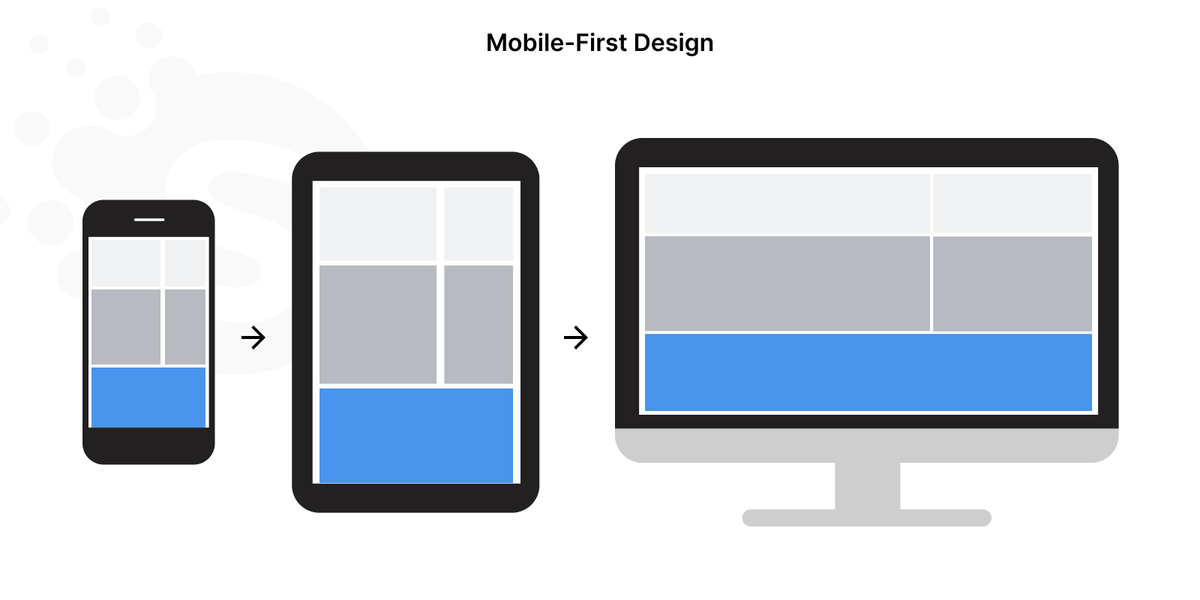
Mobile-first design is an approach that prioritizes building solutions for mobile devices over desktops. Since mobile devices generate most website traffic, designers should provide the best user experience for this massive audience segment.
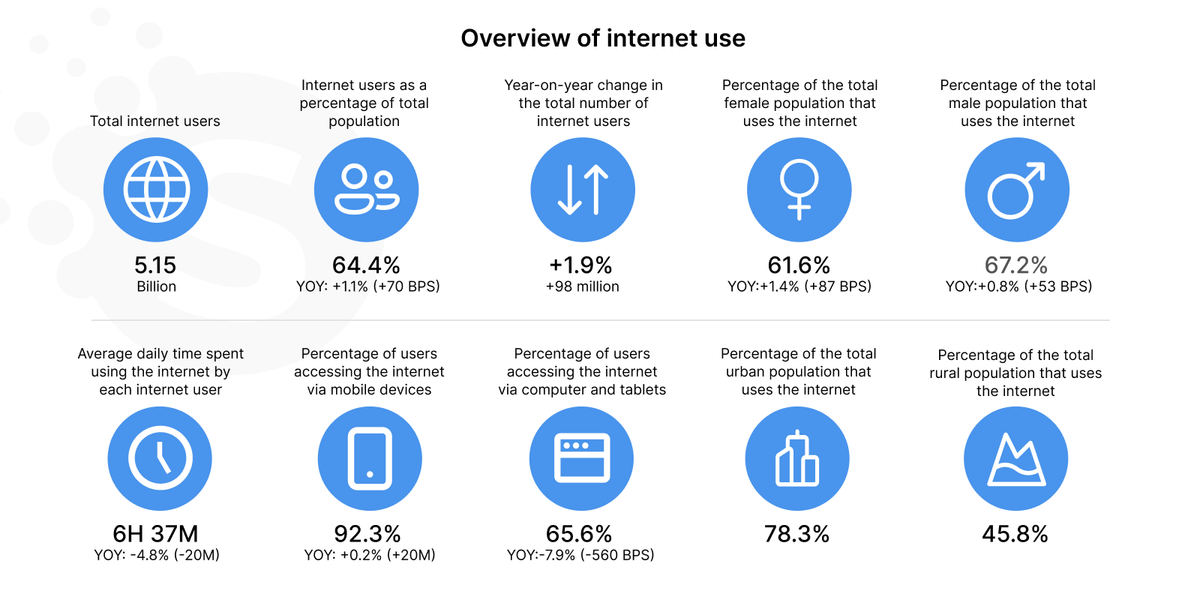
The latest statistics prove that the mobile-first approach makes sense. According to the Digital 2023 Global Overview Report, 92.3% of users go online via mobile devices – 0.2% more than in 2022.
Mobile-centered design involves simple layouts, clear and legible typography, and easy-to-use navigation. It’s optimized for small screens and touch-based interactions.
Designers using the mobile-first approach rely on software and tools like Sketch, Adobe XD, or Figma. They build solutions adapted to different screen sizes and resolutions. We at Softermii contribute to the Figma Community with free design resources.
Some examples of mobile-first design websites include Airbnb, Etsy, Spotify, Uber, Instagram, and Snapchat.
What is Desktop-First Design?
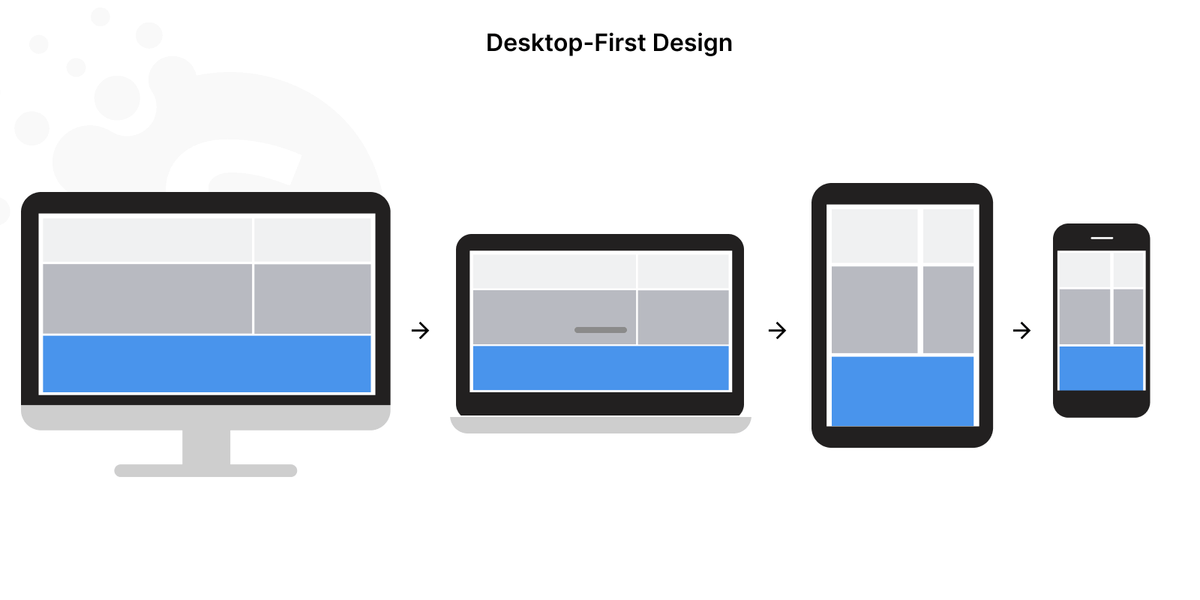
Desktop-first design is an approach that prioritizes designing and coding with desktop devices in mind. It involves creating a website layout, design, and user experience optimized for larger screens of PCs and laptops.
Such solutions involve complex layouts with multiple columns and advanced interactions like hover effects. Besides, they often include elements that may not work well on mobile devices, like pop-ups and large graphics. Designers can use the additional space for displaying versions with more content and features.
For desktop-first design, specialists usually use more sophisticated tools and software, such as Adobe Photoshop and Illustrator.
Some famous examples of desktop-first websites include TechCrunch, Forbes, Microsoft, Coca-Cola, and Rolex.
Mobile First or Desktop First: What to Choose?
The choice between a mobile or desktop first design approach depends on your target audience, website goals, and features’ complexity. Let’s discover some relevant use cases for each option.
Here’s when it’s worth using the mobile-first approach:
- Most of your website's traffic and sales come from mobile devices. From this perspective, the mobile-first approach boosts engagement and helps convert first-time visitors into loyal customers.
- You want to improve your website speed. By optimizing for mobile devices, you can reduce page load times and improve overall website performance.
- You need to prioritize content. With limited screen space on mobile devices, you should focus on the most critical content and eliminate optional information.
In contrast, the desktop-first approach is more appropriate in the following cases:
- Your target audience mostly consists of desktop users. In that case, you should give them the advantage of a larger screen space. In particular, desktop solutions are more convenient for office and remote workers.
- Your website has complex features. Desktop devices offer more processing power and larger screen space. Thus, it’s easier to implement advanced functionality.
- Your website relies heavily on visual design elements like images, videos, and animations. Desktop devices offer larger screens, better resolution, and more advanced graphics processing capabilities.
What is Responsive Web Design?
Responsive web design aims to create websites adapted to different screen sizes, including desktops, tablets, and smartphones. It uses a combination of flexible grids, images, and media queries to create a fluid and responsive layout. This way, it automatically adjusts to users’ devices.
Web developers can efficiently implement a mobile-first or desktop-first approach using Bootstrap. Also, they should create responsive designs optimized for different screen sizes.

Choose among 120 software specialists
Hire an offshore dedicated team or a few team members for your project. We guarantee 10% of deviation in deadlines and cost.
Hire a teamHere are some pros and cons of responsive web design:
Pros:
- Your website looks and performs well on all devices, improving the user experience and engagement.
- With a single codebase, you can easily maintain your website and update its content.
- Responsive web design doesn’t require duplicating content. It makes your website mobile-friendly, which can improve your SEO.
- Building responsive websites is more cost-effective than creating separate versions for different devices.
Cons:
- Responsive design requires careful planning and execution. Only this way will your website work properly across all devices.
- It results in longer loading times, especially on mobile devices. This issue affects user experience and engagement.
- Responsiveness limits your design styles. Thus, you should choose from more standardized and uniform variants.
Here are the most widespread use cases for responsive web design:
- You want your website to look good and perform well on all devices without creating separate versions.
- Your website contains much content that must be accessible on different devices.
- You strive to make your website mobile-friendly and optimized for SEO.
Some well-known examples of responsive websites are Starbucks, The New York Times, Dropbox, Amazon, and Canvas.
Mobile or Desktop First: Comparison Table
Now, let’s look at a comparison table to sum up the differences between the mobile first and the desktop first approaches.
| Key Properties | Mobile-First Design | Desktop-First Design |
|---|---|---|
| Resolution Transition | Single-column, fluid layout, flexible/responsive design | Multi-column, fixed-width layout, less responsive |
| Text Quantity | Minimalistic, concise, and easy-to-read content for small screens | Longer and more detailed content requiring larger screens |
| Font Size | Larger, legible fonts that are better readable on small screens | Smaller, more intricate fonts that may be difficult to read on small screens |
| Download Speed | Smaller, optimized images and files for faster load times | Larger, higher-quality images and files that may decrease load times |
| Calls to Actions | Simple, prominent CTAs that are easy to tap or click on mobile devices | More complex CTAs requiring extra space on larger screens |
| Design Tools | Mobile-first tools like Sketch, Adobe XD, and Figma | Desktop design tools like Adobe Photoshop and Illustrator |
| User Experience | Focused on providing a seamless experience for mobile users | Offering a more robust and powerful experience for larger screens and more powerful devices |
| Navigation | Simplified, intuitive navigation | More complex navigation requiring more space and interactions |
| Content Layout | Vertical scrolling, with content arranged in a single column or a few columns | Horizontal scrolling or multi-column layouts that are challenging to navigate on smaller screens |
Which is Better, Mobile First or Desktop First?
Is mobile first or desktop first better? The answer depends on your business objectives and target audience needs. Here are some tips on choosing the right strategy for your business.
1. Know your customers
Study the demographic data and typical behavior of your target users. If they are more likely to access your website or app on mobile devices, choose a mobile-first approach — and vice versa.
2. Consider user interface
Good UX should be intuitive and easy for your target audience. For example, a mobile-first approach is a more relevant option if your users prefer scrolling. However, if they require more complex interactions, stick to the desktop-first approach.
3. Determine the product type
The mobile-first approach is more appropriate for specific businesses. For instance, these are e-commerce and renting websites, where customers tend to purchase on mobile devices quickly and effortlessly. On the other hand, the desktop-first approach is more applicable to complex software applications.
4. Define the budget
The mobile-first design calls for more effort. That’s because of designing for multiple screen sizes and resolutions. Accordingly, it seriously impacts the project’s cost.
5. Consider technical limitations
Pay attention to any technical limitations influencing your design approach. For example, if your website or app requires complex interactions or includes multiple screens, the desktop-first approach is a better fit.
6. Test and iterate
Once you have chosen the design approach, it's time to test and iterate on the design. This way, you will check if your website meets your customers’ core needs.
Softermii Is Ready to Become Your Reliable Partner
Softermii is a web development company focused on UI/UX design services. We are designing for a desktop or mobile first and also deliver responsive design solutions. If you need help deciding what to focus on, we will gladly conduct in-depth research for your project.
You can also choose a cooperation model for any budget, including part-time, full-time, time & material, and extended team. Whatever you prefer, we guarantee a balance between aesthetics and functionality. Also, we always strive to complete projects under the agreed deadline and budget.
Now, let's look at our portfolio, which contains numerous mobile-first and desktop-first designs.
92.3%
According to the Digital 2023 Global Overview Report , 92.3% of users go online via mobile devices – 0.2% more than in 2022.
A medical communication platform
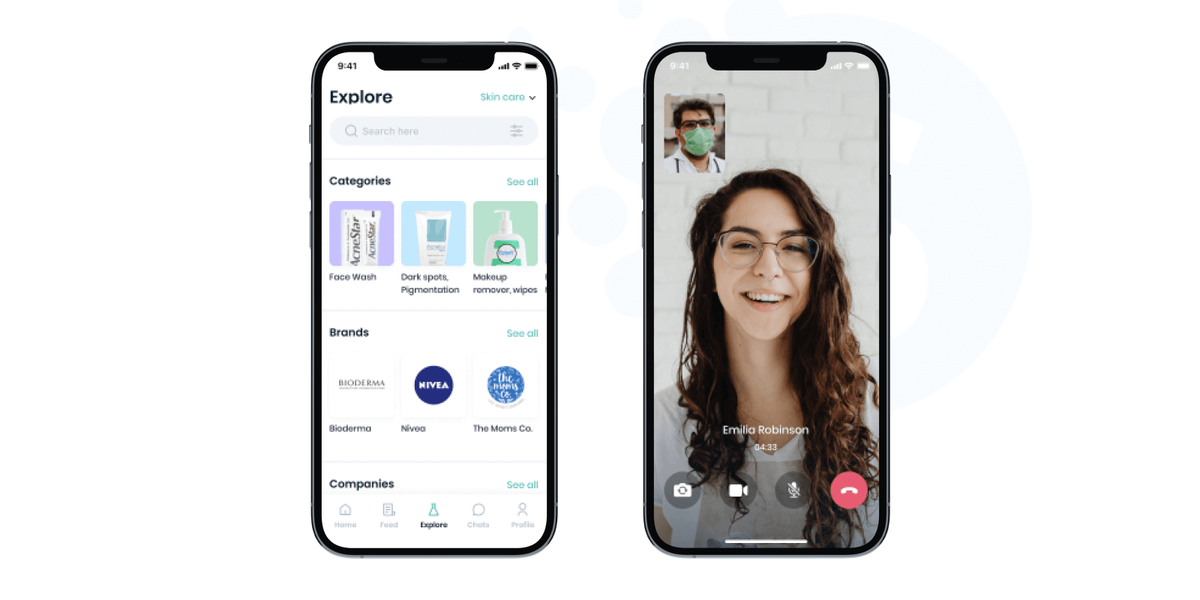
When working on the MediConnect project, we developed a business communication tool for doctors and medical product companies. The platform had to enable audio and video communication and secure payments. Moreover, we needed to build the app in compliance with HIPAA and SOC2 standards.
We created an accessible solution where users choose the necessary niche and see only relevant offers. Also, they can check information about any company, doctor, or software. As a result, almost 10,000 doctors and 360 medical companies started using the application in the first six months.
E-commerce app with broadcasting
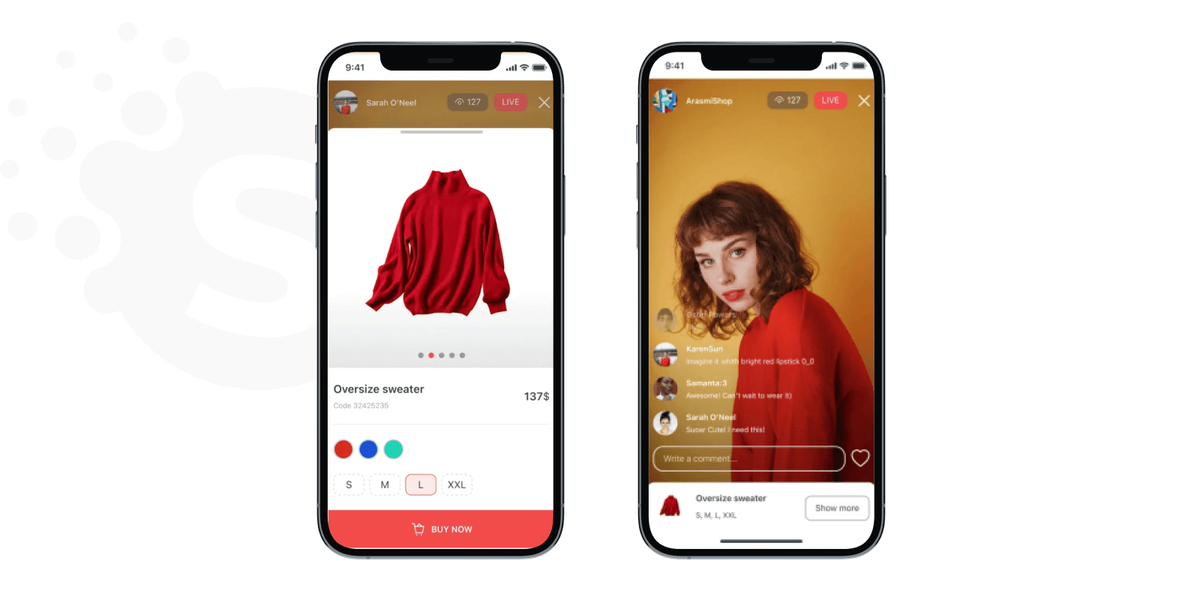
The client asked us to develop a new approach to online shopping with innovative streaming features. The project aimed to gain a foothold in a rapidly growing niche and attract the younger audience’s attention.
In 7 months, we built an app allowing sellers to go live, chat with potential buyers, and even conduct online giveaways with a randomizer. As a result, the application was installed 20,000 times in the first two weeks. Furthermore, 65% of customers are still using it. On average, prospects have a 25-minute in-app experience daily.
TikTok-like app development
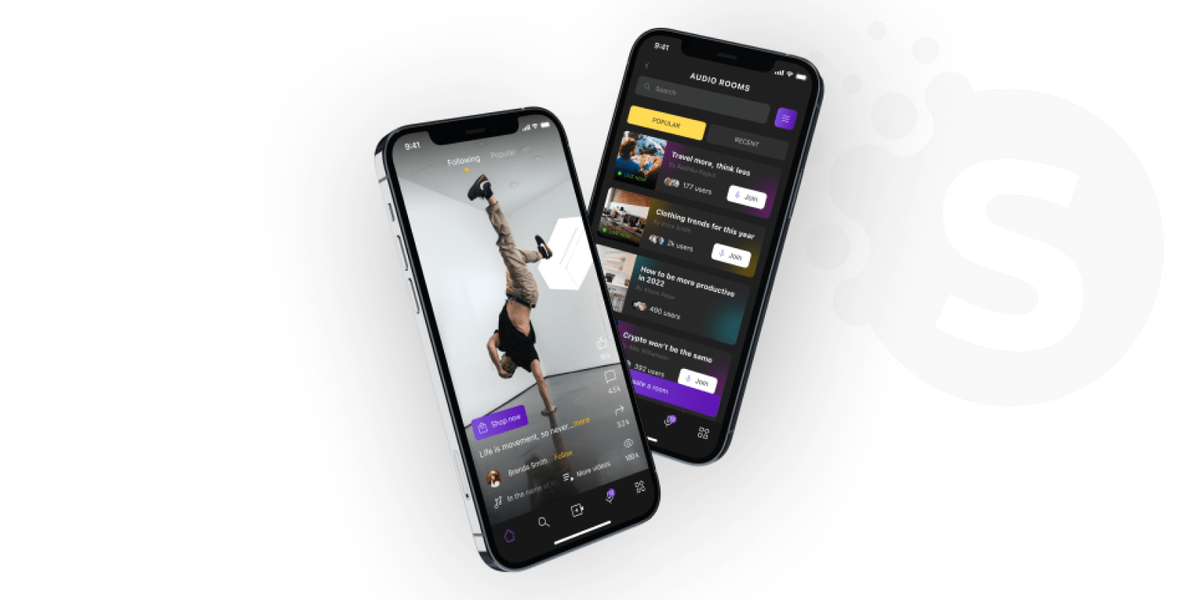
The Scrollme team needed an iOS version of a video app with private audio chats and crypto wallets. The client also wanted to improve the application's architecture to boost performance and reduce maintenance resources.
With our solutions, customers customize avatars and room themes, complete challenges, and make internal purchases. The application has 2 million monthly active users. Their average session duration is 19 minutes.
Summary
In this article, we discussed the pros and cons of mobile first website design vs desktop first. The interest in mobile-first design is growing due to the increasing popularity of mobile devices. However, the choice for your business ultimately depends on a specific project and the audience’s needs.
As experts in developing websites, we at Softermii can provide deeper insights and consultation to help you make the right decision. Don't hesitate to contact our team – we are always ready to assist you regarding your software project.
Softermii web development expertise enables us to offer insightful advice for informed decision making.
Frequently Asked Questions
Is mobile-first design more complex than desktop?
Mobile-first design can be more complex than the desktop-first approach due to the multiple screen sizes and resolutions. Besides, it requires a consistent user experience across all devices.
Is it better to design mobile-first?
With the increasing dominance of mobile devices in Internet usage, the mobile-first approach leads to better user engagement and conversion rates. However, the best solution depends on your specific business needs and target audience.
Why is mobile-first easier?
Mobile-first design is sometimes easier due to its focus on simplicity and efficiency. Still, mobile-focused solutions can also be more complex. In particular, you will need designs for multiple screen sizes and resolutions. Ultimately, the ease of mobile-first design depends on the specific project requirements and the expertise of the hired team.
What are the disadvantages of mobile-first design?
The most significant disadvantage of the mobile-first design is the time and effort you should invest in it. That’s because you should ensure it works well across multiple screen sizes and resolutions. Additionally, the mobile-first approach prioritizes a specific user group, leaving desktop users’ needs aside. Thus, it may not be suitable for businesses that rely heavily on desktop traffic.
What is mobile-first ranking?
Let’s compare mobile first indexing vs desktop first. Google gives the mobile version of a website priority when it comes to search engine rankings. This fact reflects the growing importance of the mobile-centered approach in today’s Internet usage.
How about to rate this article?
1117 ratings • Avg 4.9 / 5 · Thanks for rating!
Written by:

Co-Founder
Andrii Horiachko is a Co-Founder of Softermii with over 12 years of experience in software development, eight of them spent building and managing Softermii itself. He is responsible for technology-innovation in clients’ projects, making sure every product runs on a modern, carefully chosen tech stack that can sustai…